Artificial intelligence is moving beyond chat windows and becoming more capable of interacting with software. Modern AI agents can potentially open applications, navigate websites, work with files, execute tasks, and complete multi-step workflows on a computer.
This creates an interesting possibility: what if you could control a desktop AI agent even when you are away from your computer?
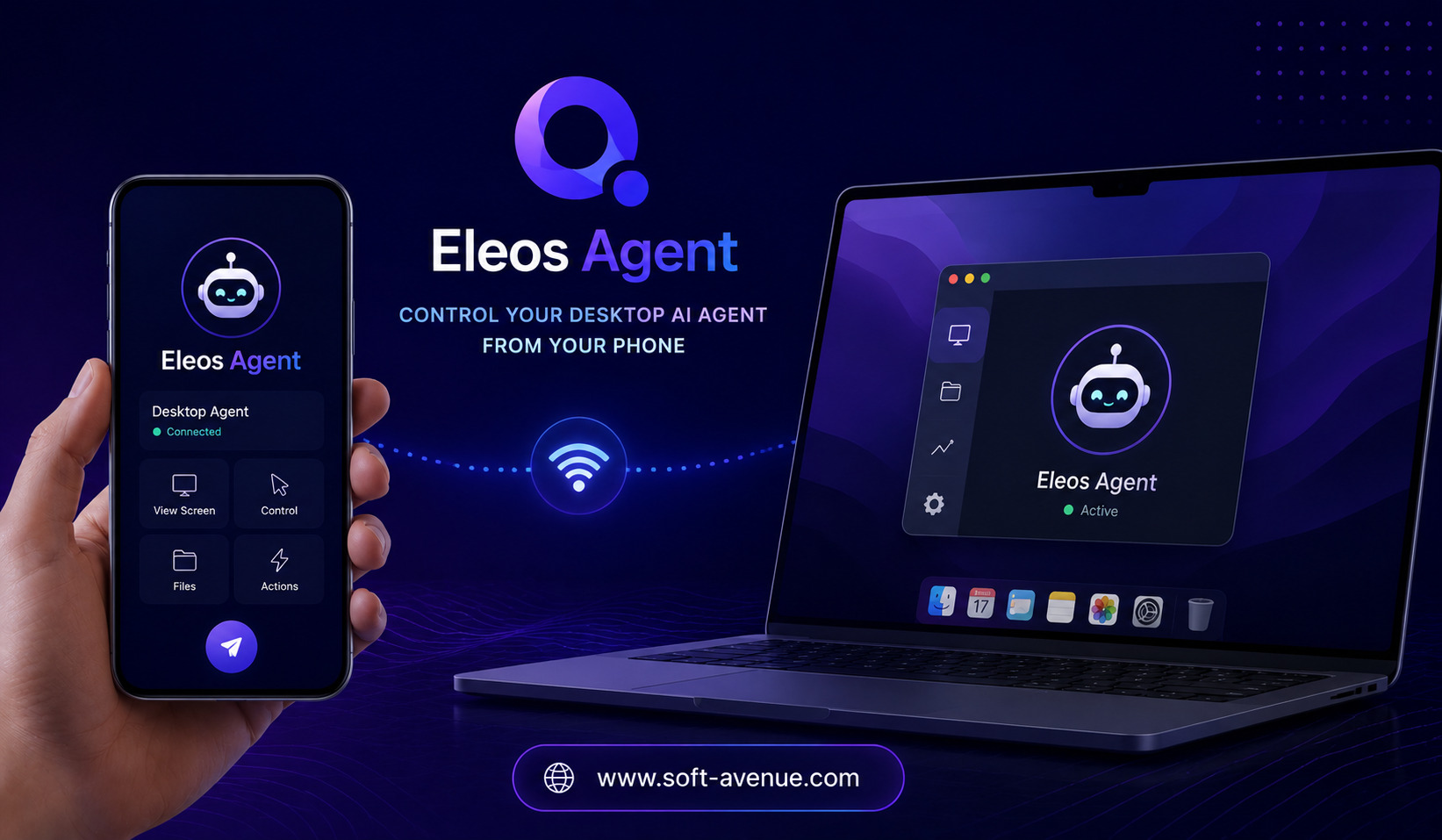
That is the idea behind Eleos Agent, a concept centered on managing desktop AI agents remotely from a smartphone. Instead of needing to remain in front of a Mac or PC while an AI agent performs a task, users can interact with or monitor the agent through their phone.
For professionals, developers, entrepreneurs, and people experimenting with AI automation, this type of remote access could make desktop-based AI workflows more flexible.
What Is Eleos Agent?
Eleos Agent can be understood as a remote-control approach for desktop AI agents.
Traditional AI assistants usually operate inside a browser or dedicated application. A desktop agent is different because it can potentially interact with the computer environment itself.
Depending on its capabilities, an agent may be able to launch applications, navigate interfaces, work with documents, enter information, or perform repetitive computer-based tasks.
Eleos Agent focuses on making these AI-driven desktop workflows accessible remotely. A smartphone can become a control point through which users can check activity, issue instructions, or manage tasks while away from their main computer.
The concept brings together two trends: increasingly capable AI agents and the growing use of mobile devices as remote control centers.
Why Remote Control of AI Agents Matters
AI agents can perform tasks that take time to complete.
For example, an agent might need to process a group of files, research information, complete a workflow, or interact with a desktop application. Some tasks may take several minutes or longer.
Users do not necessarily want to sit in front of the computer and watch the process.
Remote access changes this.
A person could start an AI task on their computer and then move away. If the agent supports remote interaction, the user could potentially monitor progress or provide additional instructions from a phone.
This makes AI automation feel less tied to a physical workstation.
How Desktop AI Agents Differ From Chatbots
A chatbot primarily communicates through text.
You type a question, and the AI generates a response.
A desktop AI agent can go a step further by interacting with the environment where work needs to happen.
For example, instead of simply explaining how to organize files, an agent could potentially perform parts of that workflow within a desktop environment.
This distinction is important because desktop agents can participate in real-world digital workflows rather than simply describing them.
Eleos Agent’s remote-control concept adds another layer by allowing users to interact with those workflows without necessarily being physically present at the computer.
Using a Phone as a Remote AI Interface
Smartphones are already used to control many aspects of our digital lives.
People manage email, calendars, smart-home devices, cloud services, and workplace applications from their phones.
A remote interface for AI agents extends this idea to desktop automation.
Instead of opening a desktop screen to check whether an AI task is complete, a user could potentially use their phone to view the agent’s status.
The phone can become a lightweight command center for desktop AI activity.
This is especially useful when the user’s primary computer is located in an office or at home while they are traveling or working elsewhere.
Potential Use Cases for Eleos Agent
There are several situations where remote AI-agent control could be useful.
Monitoring Long-Running Tasks
Some AI workflows may take time to complete. A remote interface could allow users to check progress without remaining at the desktop.
Managing Repetitive Work
Businesses often have repetitive computer-based processes. If an AI agent is configured to perform those tasks, remote access could make it easier to supervise the workflow.
Supporting Developers
Developers may use desktop agents for tasks involving coding environments, terminals, documentation, testing, or file management.
A phone-based interface could allow them to check agent activity or send instructions while away from their development workstation.
Managing Business Operations
Entrepreneurs and small business owners frequently move between meetings, offices, and other locations. Remote AI control could give them greater visibility into automated workflows.
Handling Unexpected Situations
An AI agent may encounter an issue that requires human input. If the user receives a notification on their phone, they may be able to respond without returning to the computer.
This could make automation more practical for workflows that cannot be fully autonomous.
The Convenience of Remote AI Automation
The biggest advantage of controlling desktop AI agents from a phone is convenience.
Without remote access, an AI agent can still automate tasks, but the user may need to return to the computer whenever they want to check progress or provide instructions.
A mobile control layer reduces that dependency.
It effectively separates the location of the AI agent from the location of the person supervising it.
This could become particularly valuable as AI agents take on increasingly complex tasks.
Human Oversight Still Matters
Remote AI control does not mean that AI should operate without supervision.
Desktop agents can potentially interact with files, websites, applications, and other digital resources. Mistakes can therefore have practical consequences.
Human oversight remains important, especially for tasks involving sensitive information, financial actions, important documents, or irreversible changes.
A good remote-control system should make it clear what an agent is doing and provide users with opportunities to intervene.
The ability to pause, stop, or redirect an agent can be just as important as the ability to start one.
Security and Privacy Considerations
Remote access introduces additional security considerations.
A system that allows a smartphone to control a desktop agent must protect the communication between the devices.
Users should pay attention to authentication, account security, device permissions, and access controls.
This becomes especially important when an AI agent can access personal or business information.
If a compromised phone could provide access to an AI-controlled computer, the potential consequences could be significant.
For this reason, strong authentication and careful permission management should be considered essential components of remote AI-agent systems.
Benefits for Remote and Hybrid Work
Remote and hybrid work have made access to digital systems more important than ever.
Employees may work from home, offices, coworking spaces, airports, or while traveling.
AI agents running on a primary workstation could continue performing tasks while the user is elsewhere.
A mobile control interface can provide a connection between the employee and the desktop environment.
This could make AI automation more compatible with flexible working arrangements.
Challenges of Controlling AI Agents From a Phone
A smartphone has a much smaller screen than a desktop computer.
That creates an interface challenge.
If an AI agent is performing a complicated desktop task, users may need enough information to understand what is happening without seeing the entire computer screen.
The mobile experience therefore needs to prioritize important information, alerts, controls, and decisions.
Another challenge is reliability. Remote commands depend on connectivity between the phone and desktop environment.
There is also the question of how much control should be provided. Giving users complete access may create security risks, while limiting controls too much could make remote management less useful.
The Future of Desktop AI Agents
AI agents are gradually moving toward more autonomous computer interaction.
Instead of simply generating text or code, future agents may be capable of completing larger workflows across different applications.
As that happens, remote management will become increasingly relevant.
Users may not always want to sit beside an AI agent while it works. They may simply want to receive updates, approve important actions, and intervene when necessary.
A smartphone is naturally suited to this role because it is almost always within reach.
Final Thoughts
Eleos Agent represents an interesting direction for AI automation: allowing users to control and monitor desktop AI agents from their phones.
The concept could make desktop automation more flexible by separating the user’s physical location from the computer where an AI agent is operating.
Potential benefits include remote monitoring, faster intervention, easier management of long-running tasks, and greater convenience for developers and businesses.
However, remote AI control also requires careful attention to security, privacy, permissions, reliability, and human oversight.
As desktop AI agents become more capable, the ability to manage them remotely could become an important part of the AI-powered workplace. Instead of being tied to a desk, users could have a lightweight command center in their pocket, giving them greater control over automated digital work wherever they are.
